





EZ Preorder help
EZ Preorder theme and app compatibility
The current list of known incompatible themes, along with themes that need a settings change and do not yet have a selector preset in the app. Questions? Email support@casualecommerce.com.
Known incompatible themes
- Kingdom (preorder text only displays on hover)
- Galleria (button text not visible, and a variant switch issue)
- Mobilia
- Influence
- Align
- Darkroom
- Playroom
- Verdant
- Testament
- Atom
- Wokiee
- Trade (the theme does not use an add to cart button)
- Scenta (does not work with cart type)
Variant switching issue
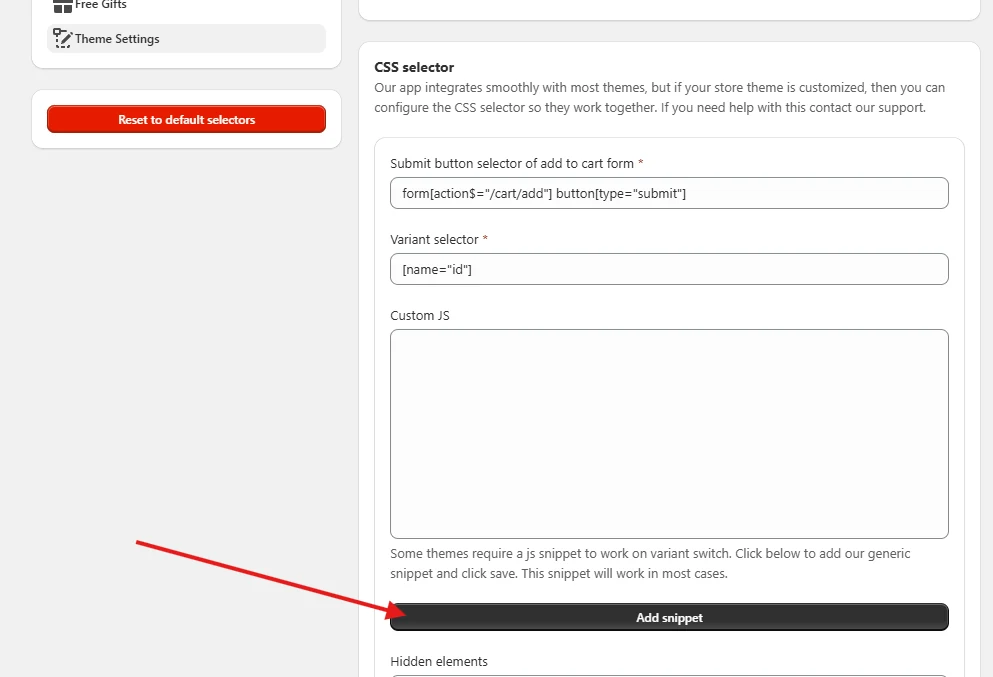
If the preorder button does not work when a shopper switches variant on your theme, a JS snippet needs to be added. We have a generic snippet that works in most cases.
- Open the Theme settings tab in the app.
- Click the Add snippet button below the Custom JS section.
- Click Save.
This fixes it in most cases. If it does not, reach out to support and we will make a custom snippet for your theme if possible.
Incompatible apps
- Globo Product Options. This app stops our variant selector from working properly. The page needs a refresh each time to update the preorder button for every variant.
- Most other preorder apps are also incompatible with ours, since both affect the same part of your store.
- Apps that change product variants can cause compatibility issues as well, specifically on variant switch.
Reach out to our support for confirmation at support@casualecommerce.com.